http://www.ruthannzaroff.com/mirkwooddesigns/templates.htm
http://yayoi.senri.ed.jp/departments/OISTech/OISDT/gr7dt/templates.htm

Friday, January 15, 2010

Friday, January 8, 2010
TGG 3M1 - Culminating Project
AND NOW…..YOUR CULMINATING ACTIVITY!
TGG 3M1
Create a package design and logo for one of the following companies:
1. Gourmet snack food.
Logo plus container/package for the snack food
2. Clothing store with its own line (e.g. H&M)
Logo plus box or shopping bag
3. Hip urban coffee shop.
Logo plus coffee cup
*Bonus activity – if you’re a graphics superstar and can’t get enough – once you have completed this entire culminating activity, you can also design a sign for the store and decide on a location (street, mall, strip mall, web only?)
Note: Pay attention to the suggestions in both your logo and package design handouts. Read through them carefully!
Procedure:
Step I
· Invent your brand. Come up with a name and the spirit and personality of your company.
· Research similar products.
· Find examples of similar products.
· Write an objectives statement. Define the purpose and function of the packaging, the audience, and the information to be communicated. On a sticky note or index card write two or three adjectives that describe the spirit or personality of your company and product line. Keep this in front of you while sketching.
Step II
Design a logo for your snack food, clothing line, or coffee.
· Your logo can be in any of the following configurations – logotype, initials, pictorial visual, abstract visual or any combination.
· Produce at least twenty sketches of your logo ideas (at least four sketches for each logo configuration i.e. 4 initials, 4 logotypes, 4 pictorials, 4 abstracts)
· The logo should be self-contained and be able to “float” anywhere; for example, it should not be dependent upon being positioned in the corner of a page.
· Design a package or container for your company’s product.
· The packages must include the following information: logo and brand name.
· Produce at least twenty sketches of your package ideas
Step III
· Produce at least two roughs for the package before creating a preliminary mock-up.
· Create a preliminary mock-up to see how it will look in three-dimensions. (you can print it on the black and white printer, or sketch it by hand)
· Produce three roughs of your logos on the computer.
Step IV
· Create a finished mock-up for the package (Print in colour and fold to its specifications).
· The size of the package should be similar to the sizes of other products in its category.
· Create your final logo on the computer program that you think is most appropriate.
Step V
· Write a brief statement explaining your design choices and why you feel they communicate the intended message.
· Briefly explain your technical process (in a few sentences – programs used, original images/photos, alterations, original drawing, scanning etc.
Presentation – meet with your client one on one (Wed. Jan. 20 orThurs Jan. 21)
· Print the flattened pre-folded version in colour (Max. 7”)
· Print your logo in colour and black and white (Max 5”)
· Mount the finished package and logos on a black board
· Present the prints and the mock-up of the package with your initial objectives statement and final written statement.
Submission requirements:
1.Drop your originals into the drop folder.
· Create a folder with your final work that has your name on it!
· You should have one file for your logos and one for your package.
2.Post your finished work onto your blog with your objectives statement and final statement in the posting.
· Remember to convert your original .ai or .psd files to .jpgs for the web.
3. Hand in your mounted printed work and mock-up to Ms. Silverman. (you can do this when you present it to your ‘client’) Print your statements and glue them to the back of the board.
This assignment must be completed by your presentation time (on the 20th or 21st) I will not accept any work past the 21st.
TGG 3M1 Culminating Activity - exercises
Culminating Projects – Logos and Packaging
TGG 3M1 Graphic Design Grade 11
Ms. Silverman
LOGO An identifying mark for a product, business or service.
Exercise One
Find one example of each of the five logo configurations listed below and write a brief analysis of each. What do you see – line, shape, colour, type, meaning. What works, what doesn’t?
Logotype: name spelled in unique typography
Initials: the first letters of the name
Pictorial visual: representation of object or objects that symbolize the product, service or organization
Abstract visual: non-pictorial visual forms to symbolize the product, service or organization
Combination: any of the above used together
Exercise Two
Skyline Energy Drink
Find a photograph of a city skyline on google images, save it in a folder on your home drive and open it in Photoshop. Using filters, layers, blending modes and adjustments, convert it to a dynamic graphic image of a city skyline. Find a way to use this image for a drink label for Skyline Energy Drink (or you can call it skyline soda, or whatever you like!).
Copy your converted image onto a new file that is 8” wide x 3.5” high @ 300 p.p.i.
The label would wrap around a tall bottle. Add the required text keeping in mind that only about 3.5 “ of the width of the label is visible from the convenience store fridge!
PACKAGING a decorative, promotional and functional way to enclose a product.
Exercise Three
Re-Design a package
Choose a low-priced packaged product, such as a box of pasta (mac and cheese). Redesign the package so it looks expensive or upscale.
Post the original product and your new and improved version on your blog and explain the changes you chose to make to the design and why those changes give the product a more upscale and sophisticated look.
These exercises should not take you more than one or two classes. In total they are worth 10 marks out of 100 for your culminating project.
On Monday we will begin the main project.
TGG 3M1 Graphic Design Grade 11
Ms. Silverman
LOGO An identifying mark for a product, business or service.
Exercise One
Find one example of each of the five logo configurations listed below and write a brief analysis of each. What do you see – line, shape, colour, type, meaning. What works, what doesn’t?
Logotype: name spelled in unique typography
Initials: the first letters of the name
Pictorial visual: representation of object or objects that symbolize the product, service or organization
Abstract visual: non-pictorial visual forms to symbolize the product, service or organization
Combination: any of the above used together
Exercise Two
Skyline Energy Drink
Find a photograph of a city skyline on google images, save it in a folder on your home drive and open it in Photoshop. Using filters, layers, blending modes and adjustments, convert it to a dynamic graphic image of a city skyline. Find a way to use this image for a drink label for Skyline Energy Drink (or you can call it skyline soda, or whatever you like!).
Copy your converted image onto a new file that is 8” wide x 3.5” high @ 300 p.p.i.
The label would wrap around a tall bottle. Add the required text keeping in mind that only about 3.5 “ of the width of the label is visible from the convenience store fridge!
PACKAGING a decorative, promotional and functional way to enclose a product.
Exercise Three
Re-Design a package
Choose a low-priced packaged product, such as a box of pasta (mac and cheese). Redesign the package so it looks expensive or upscale.
Post the original product and your new and improved version on your blog and explain the changes you chose to make to the design and why those changes give the product a more upscale and sophisticated look.
These exercises should not take you more than one or two classes. In total they are worth 10 marks out of 100 for your culminating project.
On Monday we will begin the main project.
TGG 3M1 - Posting your SNP work
Please post the work you did with your group for the Student Nutrition Program in your blog. Make sure you embed the video, image, animation etc. directly into the posting.
Then write about the following:
1. What was your intended message? (To inform, encourage, de-stigmatize?)
2. How did you achieve this? (Through video, a poster series, interactive media etc.)
3. Please explain how you used the specific medium in order to get your point across (e.g. the use of music in video or animation, the use of a quiz in the interactive game to help educate and inform, the use of colour, image and text on the posters...)
4. Are you happy with your final results? Why/Why not? Please be specific.
Please post and finish your written by Monday.
Then write about the following:
1. What was your intended message? (To inform, encourage, de-stigmatize?)
2. How did you achieve this? (Through video, a poster series, interactive media etc.)
3. Please explain how you used the specific medium in order to get your point across (e.g. the use of music in video or animation, the use of a quiz in the interactive game to help educate and inform, the use of colour, image and text on the posters...)
4. Are you happy with your final results? Why/Why not? Please be specific.
Please post and finish your written by Monday.
Thursday, January 7, 2010
Package Design
Here's a link to a website that seems to have free templates for various shapes and sizes of boxes, bags etc. http://popsop.com/6315
Wednesday, December 2, 2009
TGJ 3MG - December 6th Poster Assignment
Your next assignment will be to create a poster that sends the message of ending violence against women. December 6th is coming up and it is the 20th anniversary of the Montreal Massacre. I've included a link to the CBC archives where you can read articles, watch TV news spots and listen to radio programs from 1989 and the present to give you an overview of the story and also some responses to it.
On Dec. 6 1989 a lone gunman shot 14 engineering students - all women in Montreal before turning the gun on himself. It was a deliberate act against women and it sent people into shock, including men who started the white ribbon campaign (men against violence against women).
Your poster must communicate the following messages:
1. The message that this incident will not be forgotten, nor will those women - i.e. their deaths were not in vain.
2. The message that it is now the 20th anniversary of this incident known as the Montreal Massacre
Specifications:
Size: 10x16@300p.p.i.
Program: You may use Photoshop or Illustrator
You may choose to include an image, but you don't have to.
You may use a photograph that you find on the internet, as long as it is altered in such a way that the resolution works for the size of the poster
You may use black and white or colour, or both
You may choose to focus on the broader issue of violence against women, the white ribbon campaign, or the montreal massacre itself, focusing on the 14 women who were killed that day.
Link to CBC archives click HERE.
Due: Friday December 11, 2009
On Dec. 6 1989 a lone gunman shot 14 engineering students - all women in Montreal before turning the gun on himself. It was a deliberate act against women and it sent people into shock, including men who started the white ribbon campaign (men against violence against women).
Your poster must communicate the following messages:
1. The message that this incident will not be forgotten, nor will those women - i.e. their deaths were not in vain.
2. The message that it is now the 20th anniversary of this incident known as the Montreal Massacre
Specifications:
Size: 10x16@300p.p.i.
Program: You may use Photoshop or Illustrator
You may choose to include an image, but you don't have to.
You may use a photograph that you find on the internet, as long as it is altered in such a way that the resolution works for the size of the poster
You may use black and white or colour, or both
You may choose to focus on the broader issue of violence against women, the white ribbon campaign, or the montreal massacre itself, focusing on the 14 women who were killed that day.
Link to CBC archives click HERE.
Due: Friday December 11, 2009
Sunday, November 29, 2009
TGJ2O1 Poster Assignment
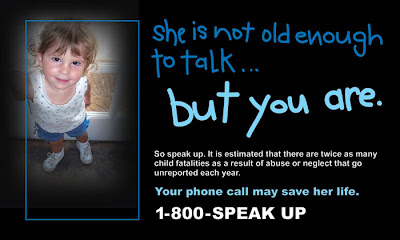
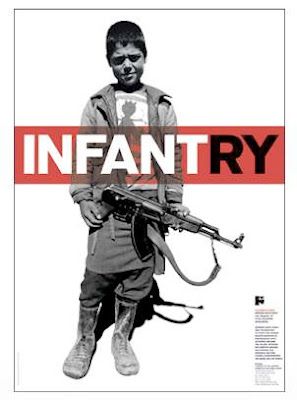
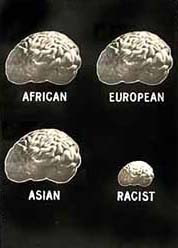
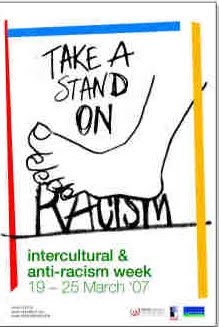
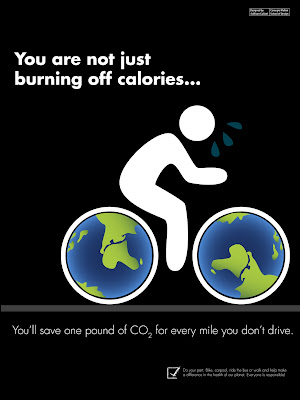
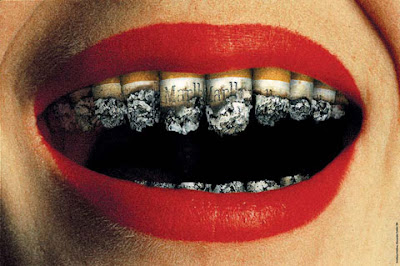
Create a poster that promotes a cause or issue of your choice. The issue will of course be the same one that you have chosen for your video assignment. The posters will be done individually. There are examples below for you to take a look at. Take note of what you look at first. Image, text, colour etc. Notice that most have little competition in terms of what draws your attention in the posters.
Then check the instructions below for your assignment.
Step 1: Do some additional research and find out more about your topic.
Step 2: Try to find a specific aspect of this topic to focus on for your poster. Decide who your audience is! Are you seeking money from the public, are you trying to get people to think and learn, are you speaking to the victims or the people involved in the issue?
Step 3: Write a paragraph on the broader issue, and also on the specific focus you are taking for your poster.
Step 4: Design a poster that expresses the mood, theme of this issue and serves to promote the cause.
Draw 10 thumbnails. Show them to a partner who can help you decide on your best 3 before going on the computer!
Choose your best 3 for roughs.
On the computer (Photoshop) produce your 3 roughs.
Choose your best rough to expand for your final work.
Hand in your 3 roughs and your final, labelled with your name (rough 1,2,3) and poster into the drop folder marked Poster.
Hand in your written paragraph into the folder marked
Poster written.
Then post your final poster to your blog with a brief written statement that explains your intent – audience, message, issue.
Parameters:
10x16” @ 300 p.p.i.
Can be in colour or black and white
Must include a slogan (catchy phrase that promotes the issue)
e.g. Racism. Stop it.
May include a photograph or image if that image is altered and unrecognizable from the original, or an original photograph if you took the photo.
You may use Photoshop CS OR Illustrator CS
Then check the instructions below for your assignment.


Step 1: Do some additional research and find out more about your topic.
Step 2: Try to find a specific aspect of this topic to focus on for your poster. Decide who your audience is! Are you seeking money from the public, are you trying to get people to think and learn, are you speaking to the victims or the people involved in the issue?
Step 3: Write a paragraph on the broader issue, and also on the specific focus you are taking for your poster.
Step 4: Design a poster that expresses the mood, theme of this issue and serves to promote the cause.
Draw 10 thumbnails. Show them to a partner who can help you decide on your best 3 before going on the computer!
Choose your best 3 for roughs.
On the computer (Photoshop) produce your 3 roughs.
Choose your best rough to expand for your final work.
Hand in your 3 roughs and your final, labelled with your name (rough 1,2,3) and poster into the drop folder marked Poster.
Hand in your written paragraph into the folder marked
Poster written.
Then post your final poster to your blog with a brief written statement that explains your intent – audience, message, issue.
Parameters:
10x16” @ 300 p.p.i.
Can be in colour or black and white
Must include a slogan (catchy phrase that promotes the issue)
e.g. Racism. Stop it.
May include a photograph or image if that image is altered and unrecognizable from the original, or an original photograph if you took the photo.
You may use Photoshop CS OR Illustrator CS
Subscribe to:
Posts (Atom)